AI image generators को लेकर सबसे बड़ी problem यह नहीं है कि options कम हैं। Problem उलटी है—बहुत ज्यादा options हैं।
आज ChatGPT, Gemini, Leonardo.Ai, Ideogram और Microsoft Designer जैसे tools free में image generation देते हैं, लेकिन इनकी limits, editing capabilities, privacy और output quality काफी अलग हैं।
इसलिए सिर्फ “कौन सबसे realistic image बनाता है?” पूछना सही comparison नहीं है।
Best Free AI Image Generator – Real Test search करने वाले creator के लिए असली सवाल है: कौन-सा tool बिना पैसे खर्च किए blog thumbnail, Instagram post, product visual, infographic या realistic image बनाने में सबसे ज्यादा useful है?
इस guide में मैं available official documentation और current 2026 free plans को compare कर रहा हूँ। इसे fake hands-on benchmark समझने के बजाय एक practical buying/selection guide मानें—क्योंकि free limits और
Best Free AI Image Generator चुनना इतना आसान क्यों नहीं है?
एक image generator की quality सिर्फ image की sharpness से decide नहीं होती।
मान लीजिए आपको blog के लिए एक thumbnail चाहिए। आपके लिए important हो सकता है:
- Image में सही text दिखाई दे
- 16:9 या 3:2 composition मिले
- बार-बार edits कर सकें
- character या object relatively consistent रहे
- free usage जल्दी खत्म न हो
- final image download करना आसान हो
दूसरी तरफ, कोई digital artist cinematic artwork बनाना चाहता है। उसके लिए style control और model selection ज्यादा important होंगे।
यही वजह है कि नीचे मैं एक universal winner देने के बजाय अलग-अलग use cases के winners बता रहा हूँ।
2026 में कौन-कौन से Free AI Image Generators सबसे ज्यादा useful हैं?
मेरी practical shortlist में ये tools सबसे relevant हैं:
| Tool | सबसे अच्छा किसके लिए | Free Access | खास फायदा |
|---|---|---|---|
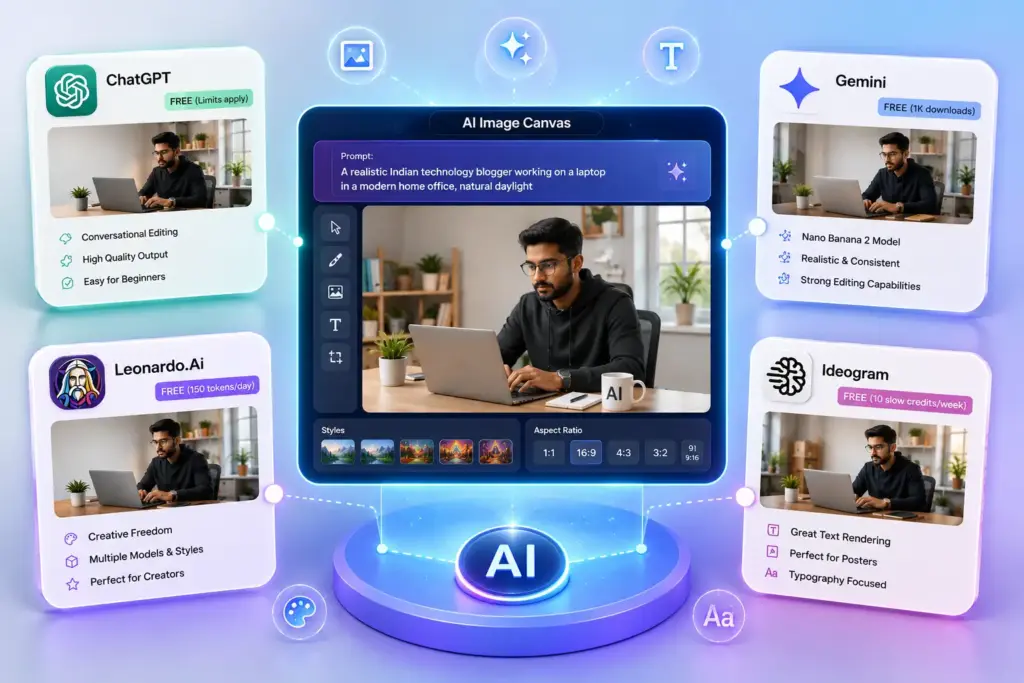
| ChatGPT Images | Beginners, editing, blog visuals | Yes, limits apply | Prompt + conversation based editing |
| Gemini | Realistic images, edits, text/infographics | Free access available | Nano Banana 2, editing & consistency |
| Leonardo.Ai | Creators और experimentation | 150 tokens/day | Models, presets, creative controls |
| Ideogram | Text-heavy graphics | 10 slow credits/week | Posters और text rendering |
| Microsoft Designer | Social graphics & quick designs | Free | Image creation + design editing |
ChatGPT के free tier में image creation available है, लेकिन image generation की separate usage limits होती हैं।
Gemini में current image generation experience Nano Banana 2 के साथ उपलब्ध है; Google के अनुसार free users 1K output download कर सकते हैं, जबकि Google AI plan users 2K downloads पा सकते हैं।
Leonardo free users को 150 tokens daily देता है।
Ideogram के current free plan में 10 slow credits per week हैं, और company बताती है कि ये up to 40 images/week तक इस्तेमाल हो सकते हैं, depending on generation settings.
1. ChatGPT Images — Best Overall for Most Beginners
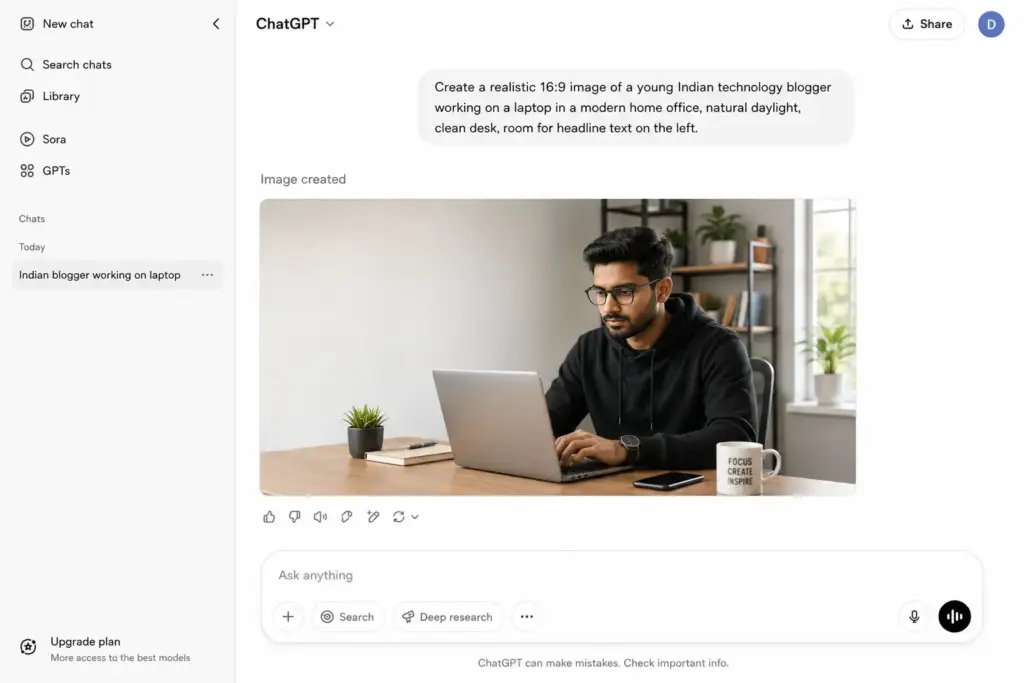
अगर मुझे एक ऐसा tool चुनना हो जिसे beginner बिना ज्यादा technical settings सीखे इस्तेमाल कर सके, तो ChatGPT Images सबसे practical choices में से एक है।
OpenAI के current documentation के अनुसार ChatGPT Images सभी tiers पर उपलब्ध है और नई image creation के साथ existing images को edit भी किया जा सकता है। यह text, details और transparent backgrounds जैसी instructions follow कर सकता है।
इसका सबसे बड़ा फायदा क्या है?
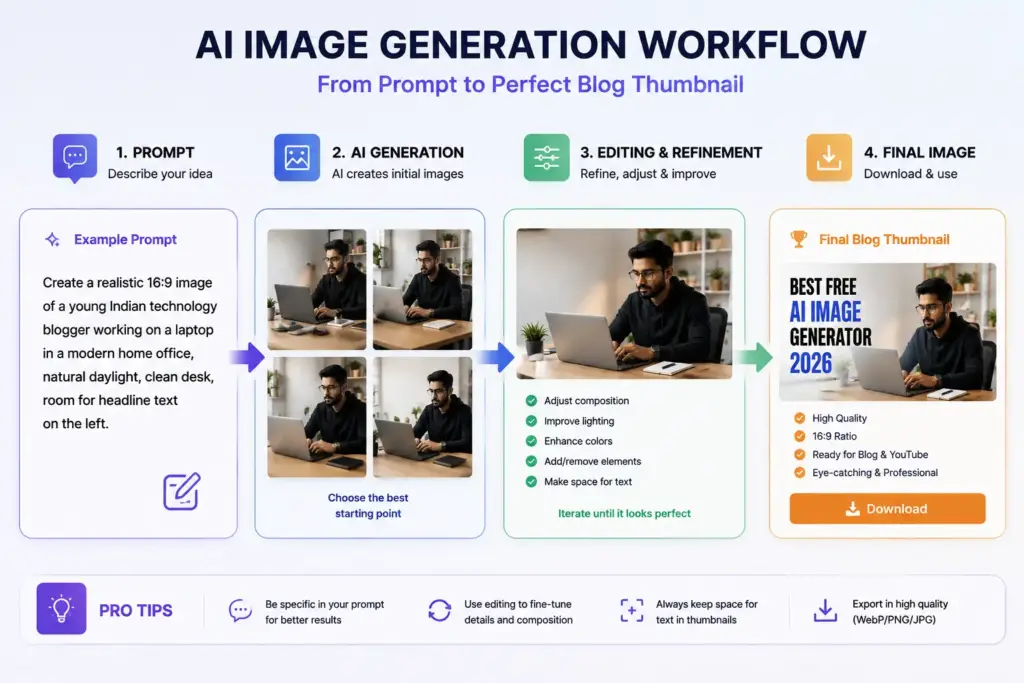
आपको सिर्फ एक prompt देकर final image पर रुकना नहीं पड़ता।
आप कह सकते हैं:
“Background थोड़ा brighter करो.”
फिर:
“Laptop को बड़ा करो.”
फिर:
“Image को YouTube thumbnail ratio में compose करो.”
यानी workflow traditional image editor की बजाय conversation-based editing जैसा बन जाता है।
किसके लिए best?
Best for: Bloggers, students, social-media creators और beginners.
Limitation
Free tier unlimited नहीं है। OpenAI image creation को separate usage-limited feature के रूप में रखता है।
2. Gemini — Realistic Images और Editing के लिए Strong Choice
Google का Gemini 2026 में काफी interesting option बन चुका है।
Google के official documentation के मुताबिक current Gemini image generation Nano Banana 2 पर आधारित है और इसमें character consistency, local edits, improved text rendering तथा detailed instruction following जैसी capabilities शामिल हैं।
यह खास तौर पर तब useful है जब आपको सिर्फ “एक image बनाओ” नहीं बल्कि generated image में लगातार बदलाव करना हो।
उदाहरण:
Prompt 1:
“Create a realistic Indian tech blogger working on a laptop.”
फिर:
Prompt 2:
“Keep the same person but change the background to a modern home office.”
यह iterative workflow creators के लिए काफी useful हो सकता है।
Google यह भी बताता है कि free/no-AI-plan users 1K resolution download कर सकते हैं, जबकि Google AI plan पर 2K download उपलब्ध है।
Best for
Realistic visuals + editing + consistency
3. Leonardo.Ai — Creators के लिए Best Free Playground
Leonardo.Ai की खासियत सिर्फ prompt डालकर image बनाना नहीं है। इसका पूरा ecosystem experimentation-oriented है।
Current pricing के अनुसार free users को 150 fast tokens/day मिलते हैं और free creations public होती हैं।
Leonardo के documentation के अनुसार अलग models और settings की token cost अलग हो सकती है। उदाहरण के लिए basic image generation relatively low token cost पर available है, जबकि advanced features ज्यादा tokens consume कर सकते हैं।
इसका मतलब 150 tokens सुनकर यह assume नहीं करना चाहिए कि आपको exactly 150 images मिलेंगी।
यही एक important mistake है जो beginners करते हैं।
खास फायदा
Leonardo अलग-अलग models, dimensions, presets और generation modes के साथ ज्यादा experimentation देता है।
Best for
Creators जो AI image generation को seriously explore करना चाहते हैं।
4. Ideogram — Text वाली Images के लिए मेरी Top Pick
अगर आपका काम posters, banners, quote graphics या ऐसी images से है जिनमें readable text जरूरी है, तो Ideogram को ignore करना mistake हो सकता है।
इसके current free plan में 10 slow credits/week हैं, और official documentation के अनुसार free users की generated images public होती हैं।
Ideogram की एक practical limitation भी समझना जरूरी है: free generation slow queue में हो सकती है और private generation जैसी सुविधाएं paid plans में आती हैं।
Best for
- Posters
- Typography-heavy visuals
- Promotional graphics
- Text-based social posts
Important warning
अगर आप client work कर रहे हैं, तो free tier की public visibility को जरूर ध्यान में रखें।
Ideogram कहता है कि generated images के ownership rights पर वह दावा नहीं करता और commercial use की अनुमति देता है, लेकिन user को third-party rights और applicable laws की जिम्मेदारी खुद देखनी होती है।
5. Microsoft Designer — Beginners के लिए Simple Option
Microsoft Designer उन users के लिए useful है जो AI image generation के साथ basic design editing भी चाहते हैं।
Microsoft के अनुसार Designer free है, हालांकि ज्यादा frequent creation के लिए subscription की जरूरत पड़ सकती है।
Designer में AI-generated visuals के अलावा image editing, templates और design refinement जैसे tools भी मिलते हैं।
इसलिए अगर आपका लक्ष्य सिर्फ artistic image नहीं बल्कि social media post या banner तैयार करना है, तो इसका workflow convenient हो सकता है।
हमारा Practical Verdict: कौन-सा Tool किस काम के लिए?
| जरूरत | Best Choice | क्यों? |
| Overall beginner | ChatGPT | Simple conversational workflow |
| Realistic + editing | Gemini | Strong iterative editing capabilities |
| Creative experimentation | Leonardo.Ai | Models + settings + presets |
| Text/poster graphics | Ideogram | Typography-focused workflow |
| Social designs | Microsoft Designer | Image + design tools |
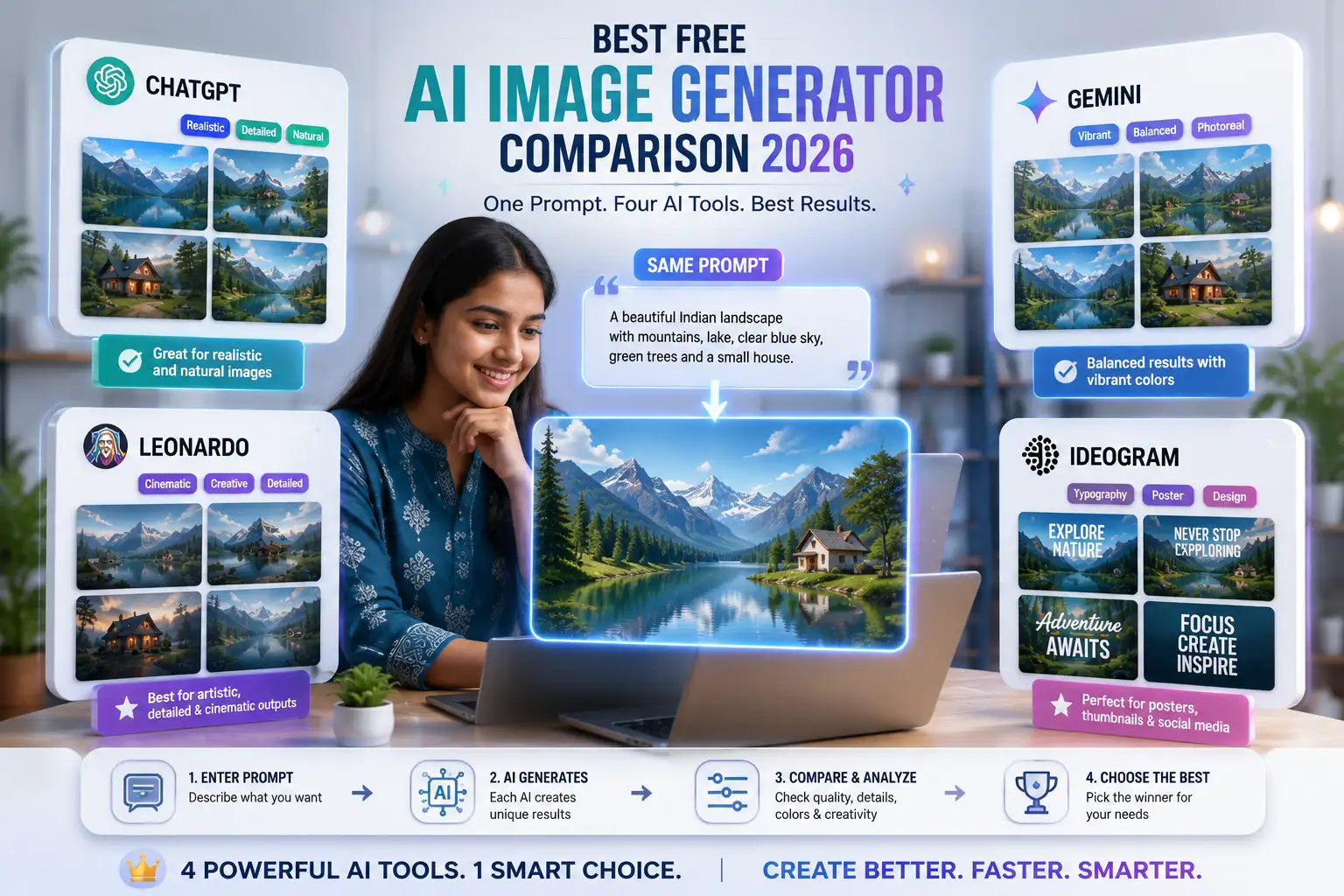
ChatGPT, Gemini, Leonardo और Ideogram में एक समान prompt डालने का original comparison screenshot.
Important: Screenshots वास्तव में generate करने के बाद ही article में लगाएं। किसी दूसरे website का screenshot इस्तेमाल न करें।
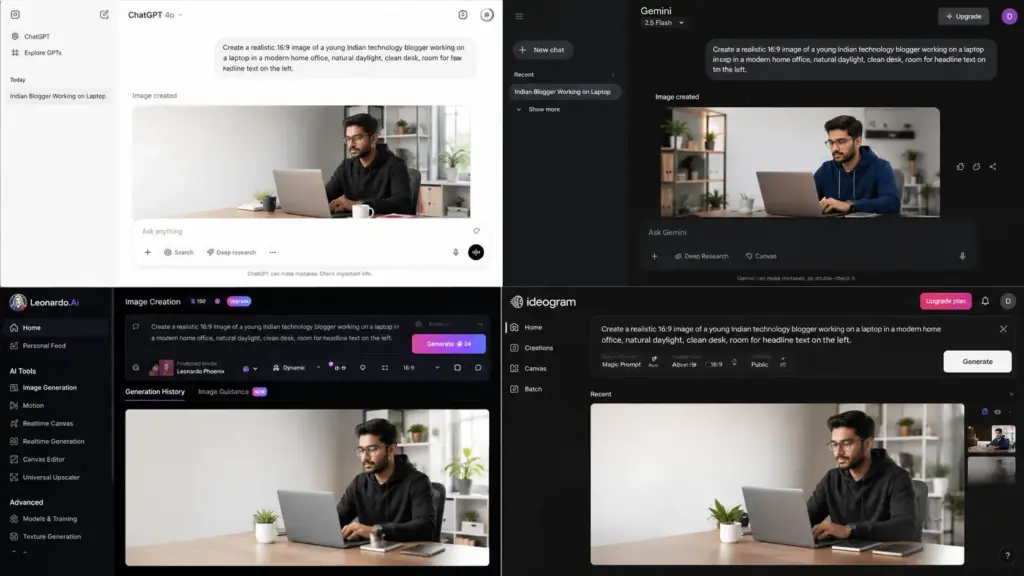
एक ही Prompt से Comparison क्यों करना चाहिए?
AI tools compare करते समय सबसे common mistake है कि हर tool में अलग prompt इस्तेमाल किया जाता है।
उससे comparison fair नहीं रहता।
एक practical benchmark के लिए एक ही prompt use करें:
“Create a realistic 16:9 image of a young Indian technology blogger working on a laptop in a modern home office, natural daylight, realistic skin texture, clean desk, premium technology blog aesthetic, room for headline text on the left.”
फिर हर platform पर देखें:
1. Subject accuracy
क्या laptop, person और room सही दिख रहे हैं?
2. Composition
क्या headline के लिए खाली space बचा है?
3. Text rendering
अगर image में text है, spelling कैसी है?
4. Realism
Hands, face, objects और lighting कितनी natural है?
5. Editing
पहली image पसंद न आने पर उसे ठीक करना कितना आसान है?
यही comparison किसी random “Top 10 AI tools” list से ज्यादा useful है।
Blog के लिए कौन-सा Free AI Image Generator चुनें?
RealTechBuddy जैसे technology blog के लिए मेरी selection use case के हिसाब से होगी।
Featured Image
Gemini या ChatGPT
क्योंकि blog feature image में realistic composition और iterative changes valuable हैं।
Thumbnail
ChatGPT / Gemini / Designer
क्योंकि आपको composition और headline placement के साथ कई iterations करनी पड़ सकती हैं।
Poster
Ideogram
Text-heavy graphics के लिए यह ज्यादा appropriate choice है।
Artistic Illustration
Leonardo.Ai
जहाँ style और creative experimentation ज्यादा important हो।
Real-World Scenarios
Scenario 1: Blogger को Featured Image चाहिए
मान लीजिए आप “Best AI Writing Tools” पर article लिख रहे हैं।
आपको एक Indian creator, laptop, AI symbols और bright workspace चाहिए।
इस situation में ऐसे tool का फायदा है जहाँ image generate करने के बाद आप तुरंत कह सकें:
“Person को right side पर shift करो और left side पर खाली space रखो।”
यह conversation-based editing workflow ChatGPT या Gemini जैसे tools में particularly convenient है।
Scenario 2: Instagram Poster में सही Text चाहिए
आपको एक promotional poster चाहिए जिसमें:
AI TOOLS 2026
जैसा readable text हो।
यहाँ Ideogram जैसे typography-focused generator को पहले try करना practical है।
Scenario 3: रोज कई Images बनानी हैं
अगर आपका workflow high-volume है, तो सिर्फ “free” देखकर tool select मत करें।
Leonardo के 150 daily tokens जैसे allowance को actual generation cost के साथ समझना होगा।
यानी free quota की संख्या से ज्यादा important है कि एक useful final image तैयार करने में कितनी attempts लगती हैं।
The Practical Insight I Would Prioritize First
AI image generator चुनते समय सबसे बड़ी mistake है केवल image quality देखना।
मेरे हिसाब से creator को यह order follow करना चाहिए:
1. Use case → 2. Editing → 3. Free limits → 4. Output quality → 5. Privacy/commercial terms
क्यों?
क्योंकि सबसे beautiful image भी बेकार हो सकती है अगर आप उसमें simple correction नहीं कर पा रहे।
उदाहरण के लिए blog thumbnail में subject center में आ गया और headline के लिए जगह नहीं बची। ऐसी situation में generation quality से ज्यादा editability important हो जाती है।
इसी तरह client work में public-generation policy समझना भी जरूरी है। उदाहरण के लिए Ideogram के free plan में generated images public होती हैं।
Common Mistakes
1. “Free” को unlimited समझना
लगभग हर major platform अपने free access पर किसी न किसी तरह की limit रखता है।
2. सिर्फ first output देखकर tool बदल देना
AI generation iterative process है। एक bad result का मतलब यह नहीं कि पूरा model खराब है।
3. हर image में बहुत लंबा prompt डालना
Long prompt हमेशा better image नहीं देता। Subject, composition, lighting, style और important constraints को clearly define करें।
4. Commercial use बिना terms देखे करना
Generated image को website पर लगाने से पहले tool की current terms और third-party rights जरूर check करें। Google भी users को generated content publish/rely करने से पहले copyright और privacy rights पर ध्यान देने को कहता है।
5. Free plan में private content generate करना
Sensitive client material, unreleased product concepts या confidential visuals के लिए free-plan privacy rules पहले पढ़ें।
Practical Checklist
- पहले image का purpose तय करें
- 16:9, 3:2 या square ratio जरूरत के अनुसार चुनें
- Same prompt से tools compare करें
- Face, hands और text manually check करें
- Free generation limits देखें
- Public/private generation policy पढ़ें
- Commercial-use terms verify करें
- Sensitive client images blindly upload न करें
- Final image को WebP में optimize करें
- Blog image के लिए descriptive filename रखें
- ALT text natural रखें
- AI image को बिना review किए publish न करें
FAQs
1. 2026 में सबसे अच्छा free AI image generator कौन-सा है?
एक single universal winner नहीं है। Beginners के लिए ChatGPT, realistic generation/editing के लिए Gemini, creative control के लिए Leonardo और text-heavy designs के लिए Ideogram practical choices हैं।
2. क्या ChatGPT में free image generation available है?
हाँ। OpenAI के current Free Tier documentation के अनुसार free users ChatGPT में images create कर सकते हैं, लेकिन image generation की अलग usage limits होती हैं।
3. क्या Gemini में free AI images बनती हैं?
हाँ। Google के current Gemini documentation में image generation उपलब्ध है और free users के लिए 1K download capability बताई गई है।
4. Leonardo.Ai में free में कितने tokens मिलते हैं?
Current Leonardo documentation के अनुसार free users को 150 tokens daily मिलते हैं। Unused free tokens अगले दिन carry forward नहीं होते।
5. क्या Ideogram free है?
हाँ। इसका free plan उपलब्ध है और current plan information के अनुसार eligible users को weekly slow credits मिलते हैं।
6. Blog के लिए AI-generated images use कर सकते हैं?
Generally use किया जा सकता है, लेकिन specific tool की current terms, copyright considerations और third-party rights जरूर check करें। सिर्फ “AI-generated” होने का मतलब automatically copyright-free या risk-free होना नहीं है।
7. क्या AI images Google AdSense के लिए allowed हैं?
AI image अपने आप में AdSense approval की guarantee या disqualification नहीं है। Website का overall content useful, original, trustworthy और people-first होना ज्यादा important है। AI-generated visuals को misleading या low-value content का replacement नहीं बनाना चाहिए।
Conclusion + CTA
अगर आप सिर्फ एक नाम पूछें, तो 2026 में Best Free AI Image Generator का जवाब use case पर depend करता है।
ChatGPT सबसे easy all-rounder options में है।
Gemini realistic generation और iterative editing के लिए strong है।
Leonardo.Ai creative experimentation के लिए बेहतर fit है।
Ideogram text-heavy graphics के लिए particularly useful है।
Microsoft Designer beginners को image generation के साथ design workflow देता है।
सबसे important बात यह है कि tool की popularity देखकर फैसला न करें। पहले यह तय करें कि आपको blog image, thumbnail, poster, realistic photo या artistic artwork किस purpose के लिए चाहिए।
और “free” देखकर unlimited usage assume करने की गलती बिल्कुल न करें—current free limits हर platform पर अलग हैं।
अगर आप RealTechBuddy पर AI tools practically explore कर रहे हैं, तो हमारी [10 Best AI Apps 2026 guide] को भी देख सकते हैं और [ChatGPT photo prompts guide] से image editing के लिए prompt ideas ले सकते हैं।
आपके हिसाब से कौन-सा AI image generator सबसे useful है—ChatGPT, Gemini, Leonardo या Ideogram? Comment में बताइए।
Comparison Table
| Tool | Free Access | Best Use | Main Strength | Main Limitation |
| ChatGPT Images | Yes, usage limits | Blog visuals, editing | Conversational editing | Free image generation limit |
| Gemini | Yes | Realistic images & edits | Nano Banana 2, consistency | Availability/limits can vary |
| Leonardo.Ai | 150 tokens/day | Creative creators | Models, presets, controls | Token-based usage |
| Ideogram | Weekly slow credits | Posters & text graphics | Typography workflow | Free generations are slow/public |
| Microsoft Designer | Free | Social designs | AI + design workflow | Frequent use may need subscription |
Sources: OpenAI, Google, Leonardo.Ai, Ideogram and Microsoft official documentation.
Practical Checklist
- Use case define करें
- Same prompt से tools compare करें
- Composition check करें
- Faces और hands inspect करें
- AI-generated text proofread करें
- Free limits verify करें
- Public/private rules देखें
- Commercial-use terms check करें
- Sensitive images upload करने से पहले privacy terms पढ़ें
- Final image optimize करें
- WebP format consider करें
- Descriptive ALT text लिखें
FAQ
Q: Best free AI image generator overall कौन है?
A: Most beginners के लिए ChatGPT practical all-round choice है; लेकिन realistic editing में Gemini और text graphics में Ideogram बेहतर fit हो सकते हैं।
Q: Free AI image generator में unlimited images मिलती हैं?
A: जरूरी नहीं। Platforms अलग-अलग daily, weekly या separate usage limits रखते हैं।
Q: क्या Leonardo.Ai genuinely free है?
A: हाँ, current free plan में 150 tokens/day दिए जाते हैं।
Q: क्या AI images blog में use कर सकते हैं?
A: कर सकते हैं, लेकिन tool की current terms और copyright/third-party rights की conditions verify करनी चाहिए।
Q: Text वाली AI image के लिए कौन अच्छा है?
A: Ideogram practical choice है, खासकर posters और typography-heavy graphics के लिए।
Q: क्या AI image को commercial website पर use कर सकते हैं?
A: यह tool-specific terms पर निर्भर करता है। उदाहरण के लिए Ideogram commercial use की अनुमति बताता है, लेकिन user को third-party rights की जिम्मेदारी देता है।
10 Best AI Apps 2026 — broad AI-tools comparison के लिए सबसे relevant existing article.
10 Best AI Apps 2026ChatGPT photo prompts — image editing और prompt examples
5 Viral ChatGPT Prompts for Pictures of Yourself Aesthetic Lofi Dusk AI photo prompts — AI photo
10 Viral Lofi Dusk Prompts