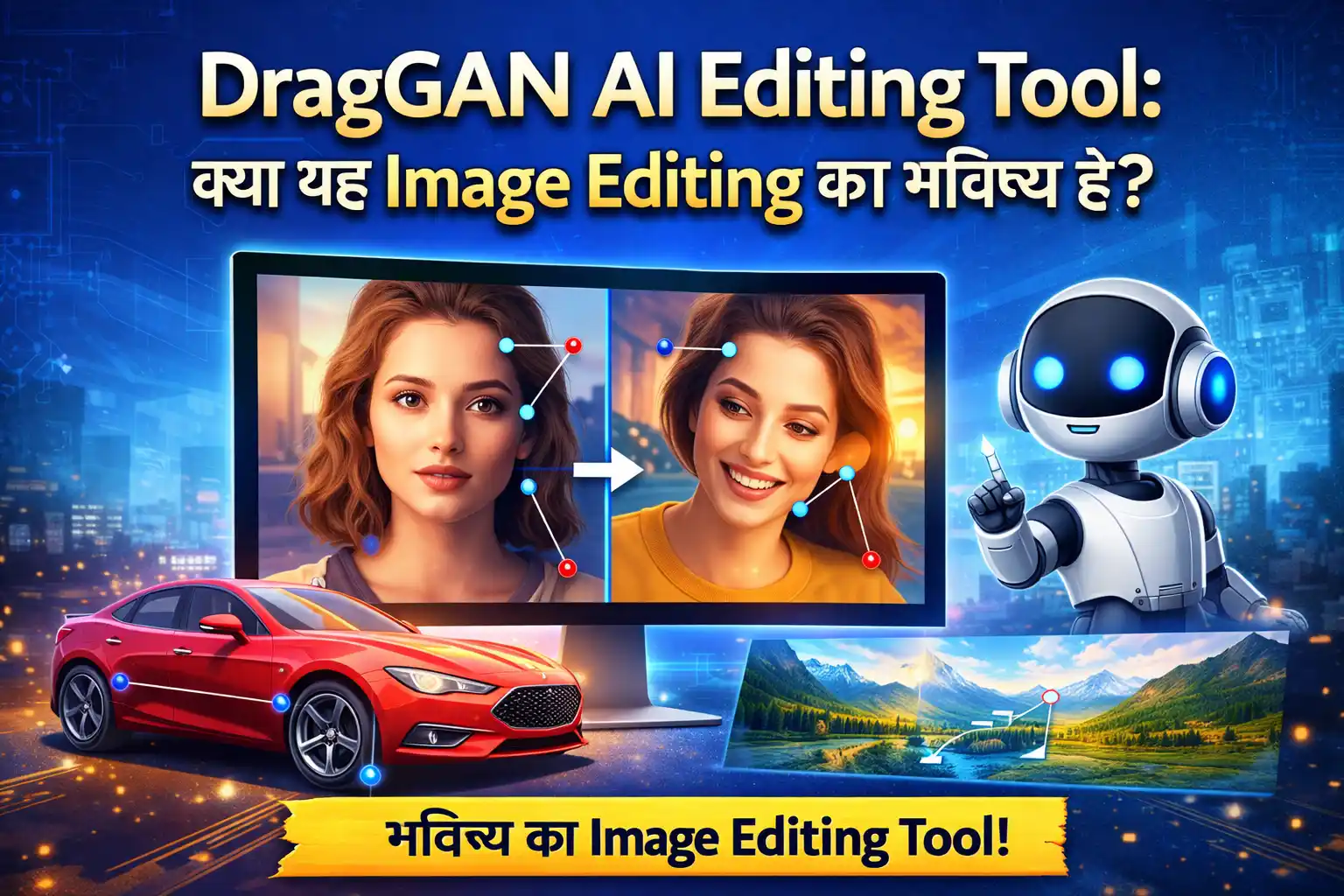
Discover how the DragGAN AI editing tool transforms image editing with drag-and-drop simplicity, GAN-powered realism, and real-time results. Full guide inside!
DragGAN AI Editing Tool: क्या यह Image Editing का भविष्य है?
Imagine करो — आपको किसी photo में एक इंसान की आँखें थोड़ी ऊपर करनी हैं, या किसी car के wheel को rotate करना है। Photoshop में आप घंटों layer, mask, और warp tool से जूझते रहते। लेकिन DragGAN AI Editing Tool के साथ? बस उस point को drag करो — और AI बाकी सब खुद कर देता है। यह सुनने में जादू जैसा लगता है, लेकिन यह असलियत है।
DragGAN ने 2023 में launch होते ही digital design और photography की दुनिया में हलचल मचा दी थी — और 2026 में यह tool creators, designers, और developers के लिए एक serious alternative बन चुका है।
DragGAN AI Editing Tool क्या है?
DragGAN एक AI-powered image manipulation tool है जो users को image के किसी भी point को simply drag करके edit करने की सुविधा देता है । यह tool Generative Adversarial Networks (GANs) पर आधारित है — मतलब AI सिर्फ pixels नहीं बदलता, बल्कि पूरे image की structure, texture, और depth को समझकर realistic बदलाव करता है ।
इसे Max Planck Institute के researchers ने develop किया था, और यह originally open-source project के रूप में launch हुआ था। इसका सबसे बड़ा USP है: कोई complex layers नहीं, कोई steep learning curve नहीं — बस click, drag, और release ।
यह कैसे काम करता है?
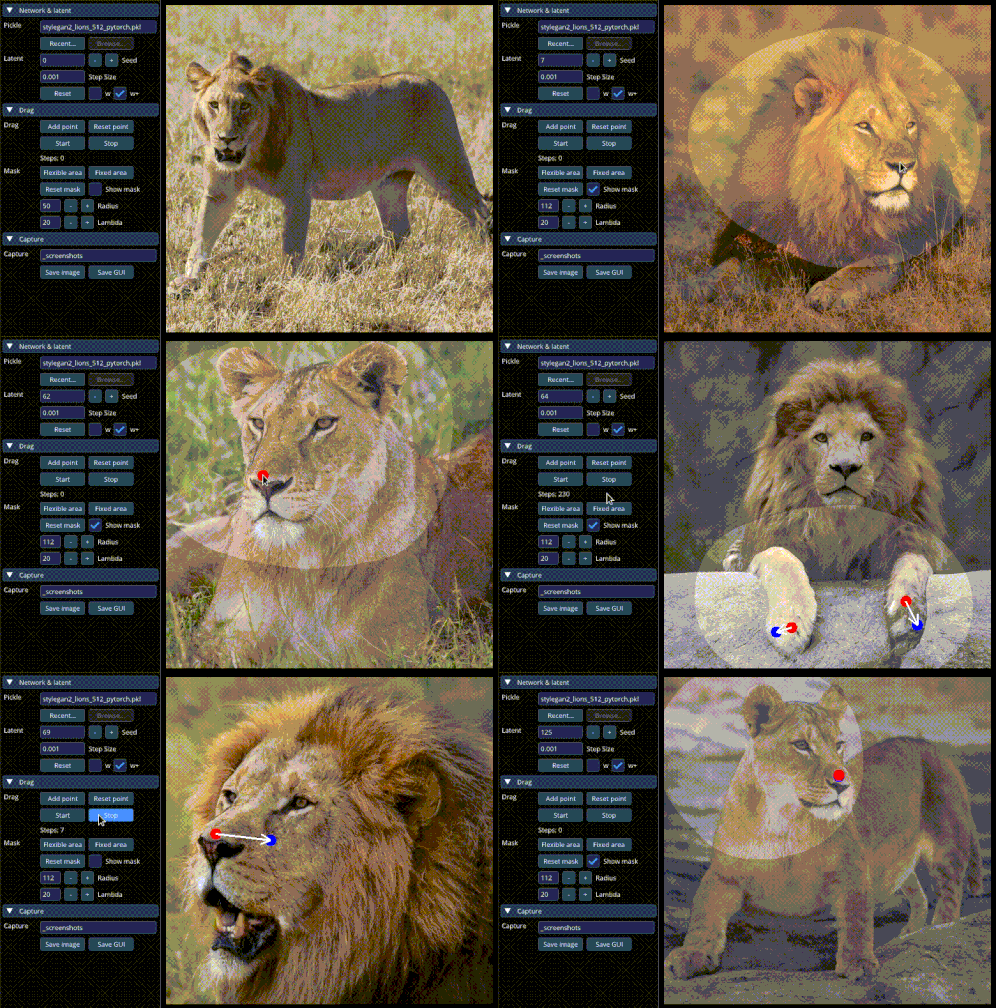
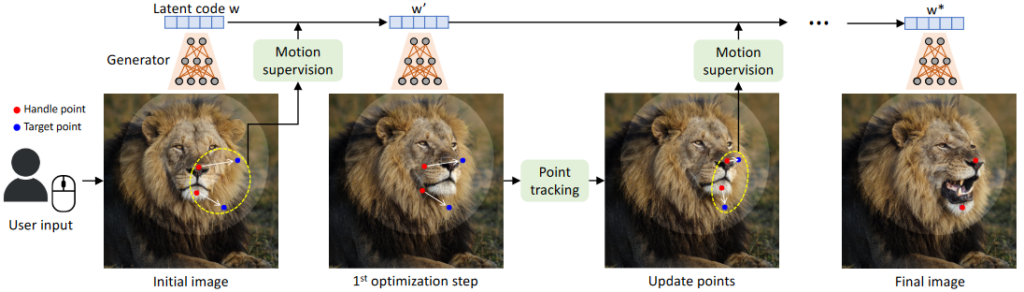
DragGAN का workflow बेहद simple है:
- Image Upload करें — अपनी photo platform पर upload करें
- Target Point Set करें — जहाँ बदलाव चाहते हैं, वहाँ point mark करें
- Drag करें — उस point को desired position पर drag करें
- AI का काम देखें — DragGAN तुरंत image को reconstruct करता है
- Refine करें — Multiple points से और adjustments करें
- Export करें — JPEG, PNG, TIFF formats में save करें
जो बात इसे special बनाती है, वो है इसकी object-aware editing। अगर आप किसी की आँखें adjust करते हैं, तो background intact रहता है। अगर car का wheel twist करते हैं, तो shadow भी automatically adjust होती है ।
DragGAN के Key Features
🎯 Intuitive Drag-and-Drop Interface
DragGAN का सबसे बड़ा feature है इसकी simplicity। कोई भी beginner बिना किसी training के तुरंत शुरू कर सकता है । Traditional tools जैसे Photoshop में जहाँ warp tool सीखने में हफ्ते लगते हैं, DragGAN में आप minutes में professional-level edits कर सकते हैं।
⚡ Real-Time Editing Preview
जैसे ही आप point drag करते हैं, changes real-time में visible होती हैं । यह feature photographers और content creators के लिए workflow को dramatically fast बना देता है। किसी creative decision के लिए अब save-and-check का इंतजार नहीं करना पड़ता।
🎭 3D-Like Pose & Perspective Control
DragGAN की सबसे unique capability है 3D-like transformation। आप किसी portrait में face का angle change कर सकते हैं, body pose adjust कर सकते हैं, या किसी object को entirely new perspective में दिखा सकते हैं । यह capability traditional pixel-based editors में practically impossible है।
🖼️ Background & Object Editing
- Background Replace: किसी भी boring background को instantly transform करें
- Image Completion: AI gaps को intelligently fill करता है
- Batch Editing: एक साथ multiple images edit करें
- Text-to-Image Generation: Text description से नई images create करें
🔧 Customizable Edit Strength
आप control कर सकते हैं कि transformation कितना intense हो। Multi-point editing feature से complex changes के लिए multiple anchor points use किए जा सकते हैं ।
DragGAN vs Traditional Image Editing Tools
| Feature | DragGAN AI | Photoshop (Traditional) |
|---|---|---|
| Editing Method | Point-and-drag on live image | Brushes, layers, manual warp |
| Object Reconstruction | AI regenerates underlying object | Pixel distortion only |
| 3D-like Manipulation | ✅ Pose, shape, perspective | ❌ Limited |
| Learning Curve | Minimal — intuitive for all | Steep — requires expertise |
| Realism of Output | Photorealistic via GAN | Depends on user skill |
| Real-Time Editing | ✅ Yes | Limited |
| Open Source | ✅ Yes | ❌ Paid software |
| Expression/Pose Control | ✅ Yes | ❌ Very limited |
यह comparison clearly दिखाती है कि speed और accessibility के मामले में DragGAN traditional tools से कितना आगे है।
किनके लिए है DragGAN?
DragGAN हर उस इंसान के लिए है जो image editing को fast, realistic, और hassle-free बनाना चाहता है:
- Photographers जो portraits में natural pose adjustments चाहते हैं
- Graphic Designers जो client work quickly deliver करना चाहते हैं
- Content Creators & Bloggers जो thumbnail और social media graphics बनाते हैं
- Web Developers जो websites के लिए visual assets create करते हैं
- Digital Marketers जो marketing images को consistent रखना चाहते हैं
- Beginners जो Photoshop सीखे बिना professional results चाहते हैं
Real User Experience: क्या DragGAN सच में काम करता है?
Users ने DragGAN को उसकी simplicity और intuitiveness के लिए खूब सराहा है । Real-time visual feedback की वजह से editing experience बेहद satisfying है। Performance की बात करें तो 3D transformations जैसे heavy tasks पर भी tool well perform करता है, बशर्ते hardware ठीक हो ।
Output quality के बारे में users का कहना है कि pose और shape manipulations में highly realistic results मिलते हैं। Creative Bloq जैसी reputable publication ने भी इसे “obsession-worthy” AI art tool कहा है ।
हालांकि, कुछ limitations भी हैं जो ध्यान में रखनी चाहिए:
- Complex, highly detailed images पर कभी-कभी artifacts आ सकते हैं
- High-end hardware पर best performance मिलती है
- बहुत specific और fine-grained edits के लिए कभी-कभी multiple attempts लगते हैं
DragGAN और SEO/Web Development की दुनिया
अगर आप एक web developer या blogger हैं, तो DragGAN आपके workflow को transform कर सकता है। Blog thumbnails बनाना हो, portfolio images को polish करना हो, या client के लिए website visuals prepare करना हो — यह tool time और cost दोनों बचाता है।
WordPress websites के लिए featured images, social media posts के लिए custom graphics, या e-commerce sites के लिए product images — सभी में DragGAN आपका go-to tool बन सकता है। Traditional tools का subscription खर्च बचाते हुए आप professional-grade output पा सकते हैं ।
DragGAN Use करने के Pro Tips
- Simple images से शुरू करें — पहले portraits या single objects पर practice करें
- Multiple small drags करें — एक बड़े drag की बजाय छोटे-छोटे adjustments बेहतर results देते हैं
- Edit strength को moderate रखें — Over-editing से artifacts आ सकते हैं
- High-resolution images use करें — Better input = Better output
- Batch feature का फायदा उठाएं — Similar edits के लिए batch processing time बचाती है
Limitations जो जाननी चाहिए
DragGAN revolutionary है, लेकिन यह perfect नहीं है। यह tool primarily individual object manipulation के लिए best suited है — complex multi-layer compositions के लिए अभी भी traditional tools की जरूरत पड़ सकती है। साथ ही, commercial use के लिए license terms और ethical considerations — जैसे deepfake misuse prevention — को ध्यान में रखना जरूरी है।
निष्कर्ष: क्या DragGAN आपके Toolkit में होना चाहिए?
DragGAN AI Editing Tool image editing को democratize कर रहा है — इसने उस barrier को तोड़ा है जो professional-quality edits और common users के बीच थी । GAN-powered intelligence, real-time feedback, और drag-and-drop simplicity का combination इसे 2026 में भी एक highly relevant और powerful tool बनाता है।
अगर आप एक content creator, blogger, web developer, या digital marketer हैं — तो DragGAN को अपने workflow में आजमाना न सिर्फ समझदारी है, बल्कि यह आपकी productivity को नए level पर ले जा सकता है।
💬 अब आपकी बारी है!
क्या आपने DragGAN AI Editing Tool try किया है? नीचे comment में बताएं कि आपका experience कैसा रहा, या किस feature ने आपको सबसे ज्यादा impress किया। अगर यह post helpful लगी, तो इसे अपने designer और developer friends के साथ जरूर share करें — और हमारे blog को subscribe करें ताकि ऐसी ही AI tools की latest updates मिलती रहें
DragGAN AI Editing Tool – Download